
RGB vs CMYK for Printing Guide for Beginners
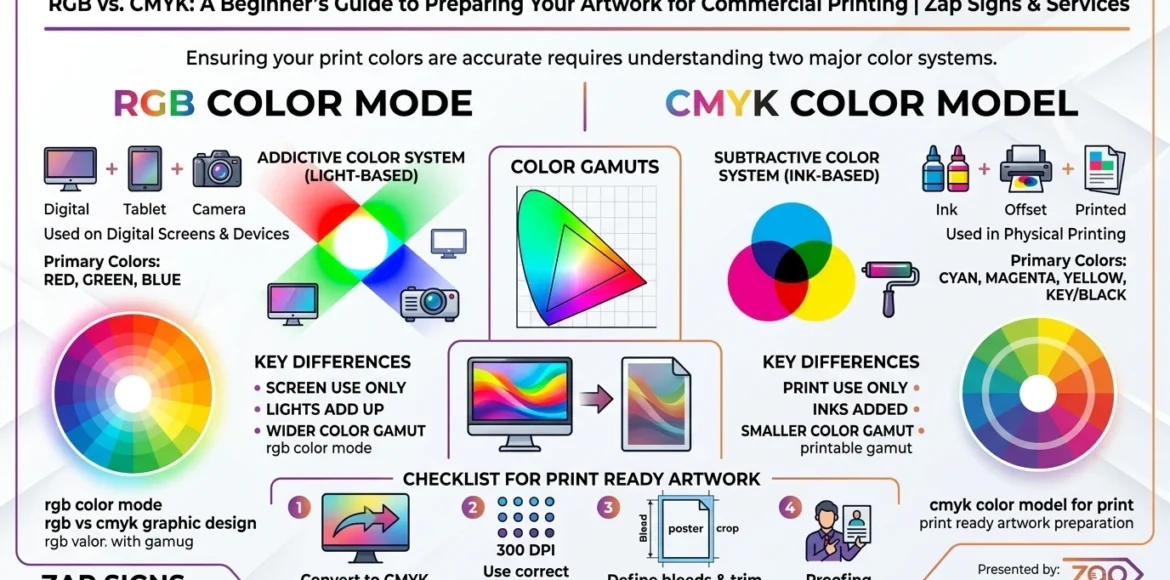
Color accuracy is crucial in commercial printing. Whether you are creating brochures business cards signage or promotional materials for your design colors must appear as intended when printed. Many businesses & beginner designers encounter problems because they design artwork for digital screens rather than print. This is where understanding RGB vs CMYK for printing becomes essential. RGB and CMYK are two distinct color models which used for different purposes. And RGB is designed for digital displays such as websites social media graphics and screens while CMYK is the industry standard for commercial printing. When art work created in RGB is sent to a printer without proper conversion the printed colors may appear dull faded or entirely different from what was expected and understanding in the differences between these two color modes ensures your marketing materials maintain professional color quality & brand consistency. Businesses that regularly print marketing materials benefit greatly from preparing artwork correctly before sending it to a printer. At Zap Signs & Services. We help businesses prepare print-ready artwork and produce high-quality commercial printing materials with accurate color reproduction and professional presentation.
What is RGB Color Mode?
RGB stands for Red Green and Blue which are the primary colors used to create digital images. The RGB color model is widely used for digital devices because it produces bright and vibrant colors that look appealing on screens.
How RGB Works
RGB uses an additive color model meaning red green & blue light combine at different intensities to produce various colors. When all three colors combine at full intensity they create white. When none are present the result is black. Adjusting the levels of these colors allows millions of color variations to be displayed.
This color system is ideal for screens because digital displays rely on light to produce images.
Where RGB is Commonly Used
RGB is primarily used for digital platforms such as:
- Websites and blogs
- Social media graphics
- Online advertisements
- Mobile applications
- Television and computer screens
- Digital presentations
Since RGB uses light rather than ink it produces brighter & more vibrant colors compared to print.
Advantages of RGB for Digital Design
The RGB color model offers several benefits for digital content:
- Wider color range: Allows for bright and neon-like colors
- Vibrancy: Colors appear more luminous on screens
- Optimized for digital platforms: Automatically used in most digital tools
However, while RGB is perfect for digital visuals it is not suitable for printing materials.
What is CMYK Color Mode?
CMYK stands for Cyan Magenta Yellow & Black. This color model is specifically designed for printing processes that use ink.
Unlike RGB, which relies on light CMYK uses ink layers to produce colors on paper or other materials. For this reason, CMYK is the standard color mode for commercial printing.
Understanding the CMYK Color Process
The CMYK printing process works by combining four inks:
- Cyan
- Magenta
- Yellow
- Black
These inks are layered in different percentages to produce a wide range of colors. By adjusting the amount of e
Common Print Materials Using CMYK
ach ink, printers can accurately recreate most colors needed for marketing materials. This process is often called the four-color printing process.
Why CMYK is Used in Commercial Printing
CMYK is used because it accurately represents how ink behaves on paper. Since printing presses and digital printers use ink instead of light CMYK ensures that colors appear as expected in the final printed product. Using CMYK from the start of the design process prevents color shifts and ensures consistency across printed materials.
Many business marketing materials rely on CMYK printing, including:
- Business cards
- Flyers and brochures
- Posters and banners
- Catalogs
- Real estate postcards
- Promotional materials
- Signage and branding graphics
Professional printing companies such as Zap Signs & Services rely on CMYK color profiles to ensure high-quality color accuracy for all printed products.
RGB vs CMYK: Key Differences Designers Must Know
Understanding the difference between RGB and CMYK helps prevent printing errors and ensures professional results.
Color Creation Method
RGB uses an additive color system based on light. Colors are created by combining red green and blue light at varying intensities.
CMYK uses a subtractive color system, in which inks absorb light and reflect certain colors to produce the final printed appearance.
Color Range
RGB has a larger color range allowing brighter and more saturated colors. Neon greens, electric blues and glowing reds appear more vivid in RGB.
CMYK has a slightly smaller color range because ink cannot reproduce some of the highly saturated colors seen on digital screens.
Screen Colors vs Printed Colors
A design may look extremely bright on a computer monitor but appear softer once printed. This happens because screens emit light while printed materials rely on reflected light.
File Preparation Differences
Designing artwork in RGB and then printing it in CMYK can lead to color inconsistencies. To avoid this problem designers preparing files for commercial printing should work in CMYK color mode from the start.
Why Using RGB Files Causes Printing Problems
Sending RGB files directly to a printer often results in unexpected color changes.
Dull or Muted Colors
Bright RGB colors cannot always be reproduced using CMYK ink. As a result, vibrant blues greens and oranges may appear less intense when printed.
Color Shifts After Printing
RGB designs may shift to slightly different shades when automatically converted to CMYK during printing. For example a bright blue might appear darker or slightly purple once printed.
Inconsistent Brand Colors
Consistent branding is essential for businesses. When RGB files are printed without proper conversion, brand colors may vary across different materials affecting brand recognition.
How to Convert RGB Artwork to CMYK for Printing
If your design was created in RGB it can be converted to CMYK before printing.
Convert RGB to CMYK in Adobe Photoshop
- Open your artwork file
- Click on Image in the top menu
- Select Mode
- Choose CMYK Color
Once converted review the colors carefully to ensure they appear as expected.
Convert RGB to CMYK in Adobe Illustrator
- Open the document
- Select File > Document Color Mode
- Choose CMYK Color
After switching modes adjust colors if necessary to maintain the intended appearance.
Checking Colors Before Printing
Many design programs include soft proofing tools to simulate how colors will appear once printed. Reviewing artwork in CMYK preview mode helps identify color shifts before printing.
Best Practices for Preparing Artwork for Commercial Printing
Preparing artwork correctly ensures professional and consistent printed materials.
Always Design in CMYK from the Start
Starting your design in CMYK helps prevent unexpected color changes and ensures accurate color reproduction.
Use High-Resolution Images
Printed materials require higher image quality than digital graphics. A resolution of 300 DPI is recommended for most commercial printing projects.
Add Bleed and Safe Margins
Bleed allows images or colors to extend beyond the trim edge of the page, preventing white borders after cutting. Safe margins ensure important text and logos are not too close to the edges.
Embed or Outline Fonts
Fonts should be embedded or converted to outlines before sending files to print. This prevents missing font issues during production.
Export Print-Ready Files
The most common file formats for printing include:
- AI
- EPS
These formats preserve design quality and maintain proper color profiles.
Common Mistakes to Avoid When Preparing Artwork for Printing
Many beginners make simple mistakes that lead to printing problems:
- Designing entirely in RGB instead of CMYK
- Using low-resolution images
- Forgetting to add bleed and margins
- Using incorrect color profiles
- Sending files with missing fonts
Avoiding these mistakes ensures smoother printing and professional-looking materials.
Why Professional Print Setup Matters for Businesses
Professional printing requires technical expertise. Businesses that invest in properly prepared artwork enjoy better marketing results and stronger brand presentation.
Correct color setup ensures consistent branding across business cards brochures signage and promotional materials. High-quality printing improves credibility and leaves a stronger impression on potential customers.
Working with experienced professionals ensures that design files meet commercial printing standards and produce the best results. Zap Signs & Services helps businesses with artwork preparation color management and expert commercial printing solutions.
Commercial Printing Services by Zap Signs & Services
Zap Signs & Services offers complete commercial printing solutions for businesses that want professional marketing materials.
Our services include:
- Business card printing
- Flyers and brochure printing
- Promotional materials
- Real estate marketing prints
- Banners and signage
- Branded marketing materials
We also assist clients in preparing print-ready artwork ensuring accurate color reproduction and high-quality results for every project.
Conclusion
Understanding in RGB vs CMYK for printing is very essential for anyone to creating marketing materials or commercial print designs. While RGB is the perfect for digital screens CMYK is the industry standard for printing because it accurately represents how ink behaves on paper. Designing artwork in the correct color mode prevents color shifts ensures consistent branding and improves the overall quality of printed materials. Businesses that follow professional artwork preparation practices using CMYK color mode high-resolution images and proper bleed settings benefit from more consistent and high-quality printed marketing materials. For companies seeking expert printing support. Zap Signs & Services provides reliable commercial printing services and guidance to ensure every project looks sharp vibrant and brand-consistent.
FAQs
1. What is the main difference between RGB and CMYK?
Ans: RGB uses red green and blue light for digital screens while CMYK uses cyan magenta, yellow & black inks for printing.
2. Should artwork always be converted to CMYK before printing?
Ans: Yes. Artwork prepared for printing should be in CMYK to ensure accurate color reproduction.
3. Why do RGB colors look brighter than CMYK?
Ans: RGB relies on light producing brighter and more vibrant colors, while CMYK uses ink which reflects light differently.
4. What file format is best for commercial printing?
Ans: PDF files with embedded fonts and CMYK color profiles are ideal for professional printing.
5. Can printers automatically convert RGB to CMYK?
Ans: Some printers can but automatic conversion may cause color shifts. Manual conversion before printing is always recommended at zap signs.